BTRC IMEI Check: Verify Your Mobile Phone in Bangladesh (NEIR, 2026 Guide)
How to check IMEI from BTRC in Bangladesh — dial *16161# or SMS KYD to 16002, or use the NEIR portal at neir.btrc.gov.bd. Step-by-step 2026 guide.
On this page ▾
Updated May 2026 — corrects the USSD IMEI check code to *16161# (the previous version of this post mistakenly used *16001#, which is a different NEIR service). Also covers the NEIR portal and the December 2025 auto-registration rule.
Since 2019, the Bangladesh Telecommunication Regulatory Commission (BTRC) has operated a programme to block illegally imported mobile phones from local networks. The system went live on 1 August 2019, matured into the NEIR (National Equipment Identity Register) with a consumer portal in 2021, and as of December 2025 BTRC has auto-registered every handset that was active on the network and now strictly enforces IMEI registration for new phones. This post is a complete, up-to-date guide to the BTRC IMEI check — via SMS, USSD, and the NEIR portal.
Quick answer — how to check IMEI from BTRC
First, dial *#06# to reveal your 15-digit IMEI. Then pick one of these three official BTRC methods:
| Method | What to do | What you enter |
|---|---|---|
| SMS | Send KYD <IMEI> to 16002 (e.g. KYD 101234567801234) | 15-digit IMEI |
| USSD | Dial *16161#, enter your IMEI when prompted | 15-digit IMEI |
| Web portal | Open neir.btrc.gov.bd, log in with your NID, enter IMEI | NID + 15-digit IMEI (up to 5 devices) |
BTRC replies with the registration status — registered, not in database, or blocked.
Don’t confuse
*16161#with*16001#. They are different NEIR services.*16161#is the IMEI check (input: 15-digit IMEI).*16001#lists the mobile numbers registered under your NID (input: last 4 digits of NID) — it does not check IMEI status. Earlier guides (including a previous version of this post) sometimes conflated them; this is corrected throughout below.
If you just needed the answer, that’s it. The rest of this post explains what the reply means, what NEIR is, what to do if your phone isn’t registered, and the 2025–2026 policy changes.
How to check if a phone is official in Bangladesh
The “official phone check” in Bangladesh is the BTRC IMEI check — the same three methods above (KYD SMS to 16002, *16161# USSD, or the neir.btrc.gov.bd portal). All three query BTRC’s NEIR database — the single source of truth for whether a phone is officially imported and registered in Bangladesh.
Three things to verify on the reply:
- The 15-digit IMEI matches what
*#06#shows on the handset (so you’re checking the device in your hand, not a sticker on the box). - The status reads “registered” — not “active in grace period” and not “not in database”.
- The reply matches the handset’s brand/model if BTRC’s response includes those fields (the NEIR portal does; the SMS reply may not).
If any of those fail, treat the phone as unofficial until you can register the IMEI yourself on the NEIR portal with proof of legal import.
Why BTRC checks IMEI (and why it matters in 2026)
On 30 July 2019, BTRC published an official notice announcing that illegally imported, cloned, or counterfeit mobile phones would be blocked from Bangladesh’s cellular networks starting 1 August 2019. The reason: the grey market was costing the government significant import duties, and unregistered handsets made it harder to trace phones used for illegal activity.
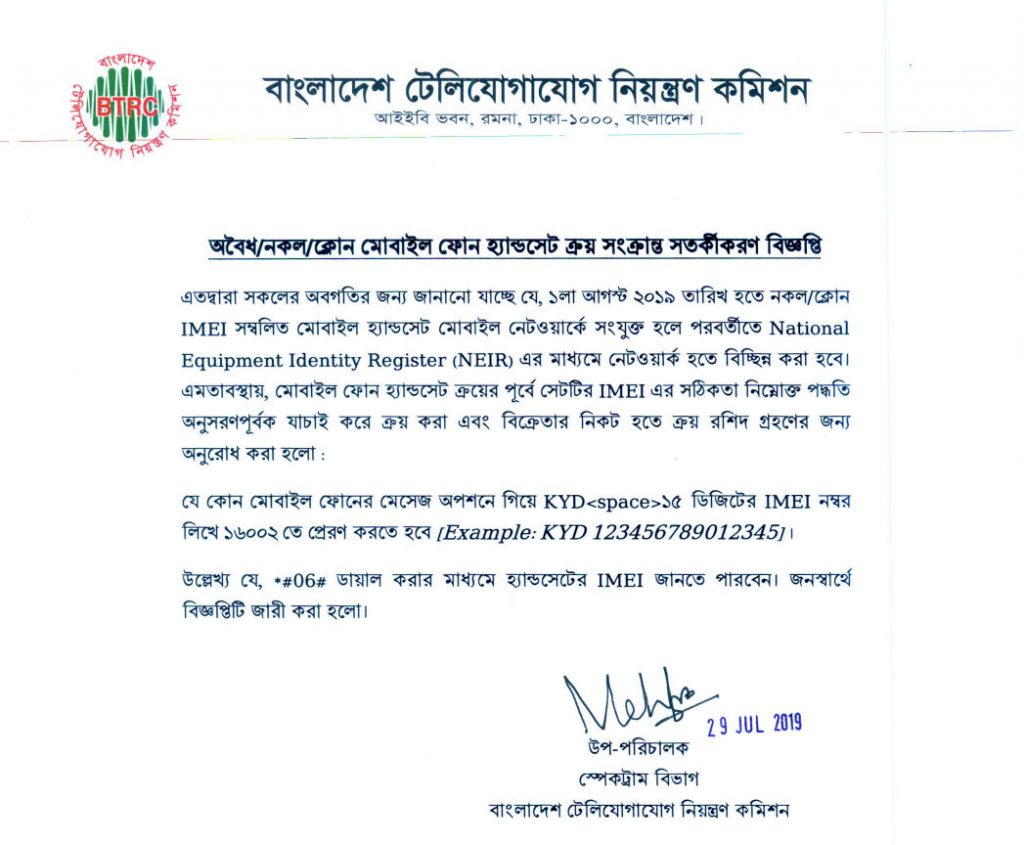 BTRC Notice: Illegally imported mobile phones can’t be used from 1st August 2019 in Bangladesh
Since then the system has matured considerably:
- 2019 — programme launched. SMS verification via
KYDto16002goes live. - 2021 — NEIR portal launched at
neir.btrc.gov.bd, adding a web interface and NID-linked registration. - 2022–2024 — multiple grace-period extensions to give time for consumer awareness and to handle tourist / visitor edge cases.
- 16 December 2025 — bulk auto-registration. BTRC declared every handset active on Bangladesh’s networks as of that date automatically registered, without requiring any user action.
- January 2026 — strict enforcement. New handsets (imported or bought after the auto-registration cutoff) must be verified and registered before they will stay on the network permanently.
If you already owned your phone and used it in Bangladesh before 16 December 2025, you are auto-registered. If you bought a phone after that date — or you’re a traveller / returnee — read on.
How to check IMEI from BTRC by SMS
The SMS route is the fastest and works on every Bangladeshi mobile operator (GP, Robi, Banglalink, Teletalk, Airtel).
- Find your IMEI. Dial
*#06#— the phone shows the 15-digit IMEI for each SIM slot. Write down the number you want to check. - Compose the SMS. Open Messages, type
KYD 15-digit-IMEI, for example:KYD 101234567801234 - Send to
16002. Standard SMS charges apply. - Read the reply. You’ll get an instant SMS from
16002:- IMEI found / registered → nothing to do. The phone is legal.
- IMEI not found / not registered → go to
neir.btrc.gov.bdand register manually.
If you purchased your mobile phone before 16 December 2025 and kept it active on a Bangladeshi network, BTRC auto-registered it in the December 2025 bulk run. You don’t need to do anything.
How to check IMEI from BTRC online (NEIR portal)
The NEIR portal at neir.btrc.gov.bd is the consumer-facing web interface to the same database. Use it when:
- You want to register an IMEI (not just look it up)
- You need to check multiple IMEIs (up to 5 devices per NID)
- You want to see full status details — not just a yes/no SMS
Steps:
- Go to neir.btrc.gov.bd.
- Click Citizen / Registration and log in with your NID (National ID) details.
- Enter the 15-digit IMEI in the IMEI search field.
- The portal shows one of three statuses:
- Registered — legally imported, permanent network access
- Active but not in database — in the grace period, register manually
- Blocked — reported stolen, cloned, or smuggled, cannot use on any network
- If the status is “active but not in database”, you can submit proof of purchase / import documents directly on the portal to register the IMEI to your NID.
How to check IMEI from BTRC via USSD (*16161#)
A USSD method that works without SMS cost or internet connectivity:
- Dial
*16161#from your handset. - When prompted, enter your 15-digit IMEI (find it via
*#06#if you don’t already have it). - BTRC replies via SMS with the registration status of that IMEI.
This is the same lookup as the SMS route — the database, the response, and the meaning are identical — just via USSD instead of an outgoing SMS. Major Bangladeshi outlets (The Daily Star, Prothom Alo, BSS News) all cite *16161# as the official BTRC IMEI USSD code.
A note on *16001# (different service, often confused)
*16001# is a separate NEIR service. It does not check IMEI status. Per the official neir.btrc.gov.bd portal:
Dial
*16001#from any mobile number registered with your NID.
Input: the last 4 digits of your NID. Output: an SMS listing every mobile number registered under your NID across all operators (GP, Robi, Banglalink, Teletalk, Airtel). It’s useful for spotting SIMs registered in your name without your knowledge — but it tells you nothing about your handset’s IMEI legality. Use *16161# or KYD to 16002 for that.
KYD reply decoder — what each BTRC SMS actually means
The reply you get from 16002 (or via *16161#) looks short but every line carries information. Here’s how to read each variant.
Reply 1 — “Your handset is registered”
Typical text:
Dear customer, your IMEI <15 digits> is registered in NEIR. Status: Active.
Translation: the handset is legally imported and on the NEIR allowlist. No action needed. Save this SMS — it’s the easiest proof for warranty claims, sales, or BTRC disputes later.
Reply 2 — “IMEI not found in NEIR”
Typical text:
Dear customer, IMEI <15 digits> is not registered in NEIR. Please register at neir.btrc.gov.bd before
.
Translation: the handset isn’t on the allowlist. Three reasons this happens, in decreasing order of likelihood:
- Bought after 16 December 2025 from a seller who didn’t file the import — fixable, register manually on the NEIR portal with the purchase invoice.
- Brought from abroad as a returnee or gift — fixable, register on the NEIR portal with passport / travel docs.
- The handset is grey-market / counterfeit — not fixable, the IMEI was never legally imported.
You’ll know which one you’re in based on where you got the phone.
Reply 3 — “IMEI is blocked”
Typical text:
Dear customer, IMEI <15 digits> is blocked. Reason: <stolen / cloned / counterfeit>.
Translation: there is no way to register this handset. The IMEI is on the deny list — either reported stolen, broadcasting a duplicate of another legal device (cloning), or imported as counterfeit. If you bought it in good faith, file a complaint at btrc.gov.bd → consumer complaints with your invoice — that’s the only path to dispute the block.
Reply 4 — “Active but not in database”
Typical text:
Your handset is currently active on the network but not yet registered in NEIR. Register at neir.btrc.gov.bd to keep service after the grace period.
Translation: BTRC sees the handset on the cell network but the IMEI isn’t on the allowlist yet. This is usually a phone bought between BTRC’s bulk auto-registration cut-off (16 December 2025) and the moment you read this — register on the NEIR portal before the per-handset grace window closes (BTRC currently quotes 60 days from first network attach, but this changes).
Reply 5 — Garbled / English-Bangla mix
If the SMS is unreadable: change phone language to English temporarily and re-send KYD <IMEI> to 16002. Some legacy keypad-style phones don’t render the BTRC reply correctly.
Tip: when something looks off, the NEIR portal at neir.btrc.gov.bd is the source of truth — the SMS is a thin summary of what the portal shows. Always cross-check on the portal if the SMS reply doesn’t match expectations.
Screenshots coming soon: I’ll add annotated SMS-reply screenshots (registered, not-in-database, blocked) to this section in a follow-up update — request them by commenting at the bottom of the post if you want to be notified.
What to do if your phone shows “not registered” after 16 December 2025
The bulk auto-registration on 16 December 2025 was a one-time event, so any phone that shows “not registered” after that date didn’t get auto-registered for a reason. Walk through these in order — most cases are fixed by step 2 or 3.
1. Verify you’re checking the right IMEI
Phones with two SIM slots have two IMEIs. Dial *#06# and send KYD for each one separately. If only one comes back as registered, the other slot still works on the registered SIM but won’t be usable independently.
2. Wait 24 hours and re-check
NEIR runs nightly reconciliation jobs — if the handset attached to a Bangladeshi network on or after 15 December 2025, it may have been queued for auto-registration but processed in a later batch. Resend the KYD SMS the next day.
3. Register manually on the NEIR portal
If the handset is genuinely not in NEIR, this is the standard path:
- Go to neir.btrc.gov.bd → Citizen Registration.
- Log in with your NID (National ID) — you’ll need OTP-based verification on a Bangladeshi mobile number.
- Click Register New Device → enter the 15-digit IMEI.
- Upload proof of legal acquisition:
- Bought in Bangladesh → seller’s Mushak invoice (VAT receipt) and the importer’s BIN if available.
- Brought from abroad as personal use → passport bio page, latest entry stamp into Bangladesh, and an airline / shipping document.
- Gift from abroad → passport of the gifter, customs declaration, your relationship proof.
- Submit. BTRC reviews within 5–10 business days; you’ll get an SMS when the decision lands.
4. If the registration is rejected
Common reasons + fixes:
- “IMEI does not match handset model” — usually a typo. Re-dial
*#06#, double-check, resubmit. If the IMEI is correct, the device may be cloned. - “Insufficient documents” — usually the invoice didn’t include the importer’s BIN. Get a corrected invoice from the seller.
- “IMEI on global block list” — the device was reported stolen abroad and the GSMA shares that list with BTRC. There is no path to register; you’ll need to refund/return the phone.
5. If you’re a returnee or visitor
BTRC offers a time-limited grace (currently 60 days from the SIM’s first attach to a Bangladeshi network) for personal handsets brought in by returnees, students, and short-term visitors. Use the NEIR portal’s “Foreign Handset” flow with passport + entry stamp; once approved, it stays on the registered list permanently.
If you’re a short-term visitor (< 90 days), you can just keep using the phone on a roaming SIM without registering — BTRC’s enforcement targets handsets connecting to local SIMs.
What happens if your phone isn’t registered
If BTRC’s reply (SMS, USSD, or portal) says your IMEI isn’t registered, you have three possibilities:
- You bought it after 16 December 2025 and the seller didn’t register the import. Register via the NEIR portal with your purchase invoice and the importer’s details.
- You brought it from abroad (returnee / visitor). BTRC allows a limited-time grace window for personal handsets; register on the portal with passport / travel documentation.
- The IMEI is cloned, counterfeit, or reported stolen. There is no path to register — the handset will be permanently blocked. Dispute via BTRC’s complaint channel if you believe this is an error.
BTRC IMEI check — common questions
How do I check the IMEI of my phone?
Dial *#06#. The phone shows a 15-digit IMEI number per SIM slot.
How do I verify if my phone is legal by BTRC?
Use any of SMS (KYD <IMEI> to 16002), USSD (*16161# then enter your IMEI), or the NEIR portal (neir.btrc.gov.bd). All three query the same database. Note that *16001# is a different NEIR service — it lists mobile numbers registered under your NID and does not check IMEI status.
What’s the BTRC SMS short code again?
16002 — same short code since 2019.
What’s the difference between SMS verification and the NEIR portal? SMS gives a quick yes/no. The NEIR portal shows full details and lets you register an IMEI manually, not just check it.
Does BTRC’s IMEI system apply to foreigners / visitors? Yes — short-term visitors generally get a grace period; longer stays require manual registration on the NEIR portal with passport details.
BTRC IMEI registration explained (NEIR internals)
For each handset legally imported into Bangladesh, the importer submits the IMEI to BTRC and it lands in the NEIR database — the National Equipment Identity Register. When you turn on a SIM, your mobile operator reports the handset’s IMEI to NEIR behind the scenes. NEIR cross-checks the IMEI against its allowlist.
If the IMEI is present and matches a legal import record, the handset stays on the network. If it isn’t — or is marked as stolen, cloned, or counterfeit — the operator eventually blocks the handset from all networks (GP, Robi, Banglalink, Teletalk, Airtel).
Cloned / duplicate IMEIs are the hardest failure mode: two different physical handsets broadcasting the same 15-digit number. NEIR flags these and blocks both until the real owner can prove ownership.
Related
- Official BTRC notice (PDF)
- NEIR citizen portal
- International Mobile Equipment Identity (IMEI) — Wikipedia
Honestly, this is a good initiative by BTRC. It nudges the grey market toward legitimate imports, helps trace stolen phones, and — now that the December 2025 auto-registration has happened — the friction for existing users is close to zero. For anyone buying a new phone in Bangladesh in 2026, just run the KYD SMS once before you pay and you’re done.