GitHub Issue to Production in 40 Minutes: Automated Code Generation with Claude Code
How I automated production-ready code generation from GitHub issues using Claude Code CLI with continuous feedback loops through pre-commit hooks, CI/CD, and PR reviews—achieving 90%+ merge-ready code in ~40 minutes.
On this page ▾
Most developers spend hours manually coding, testing, and fixing issues. I’ve automated the entire process—from GitHub issue to production-ready code—using Claude Code CLI with continuous feedback loops, achieving ~40 minutes per issue with 90%+ merge-ready success rate.
By the time a human engineer reviews the code, it’s already solid and ready to deploy.
The Problem: Writing Production-Ready Code Takes Time
Traditional workflow:
- Read GitHub issue → understand requirements
- Plan implementation → break down tasks
- Write code → manually test locally
- Run linters/tests → fix errors one by one
- Create PR → wait for CI/CD
- Fix CI failures → wait for review feedback
- Fix review comments → repeat steps 4-6
- Finally merge after multiple rounds
This process takes hours or days. What if AI could generate production-ready code automatically, using feedback loops to refine itself until it’s perfect?
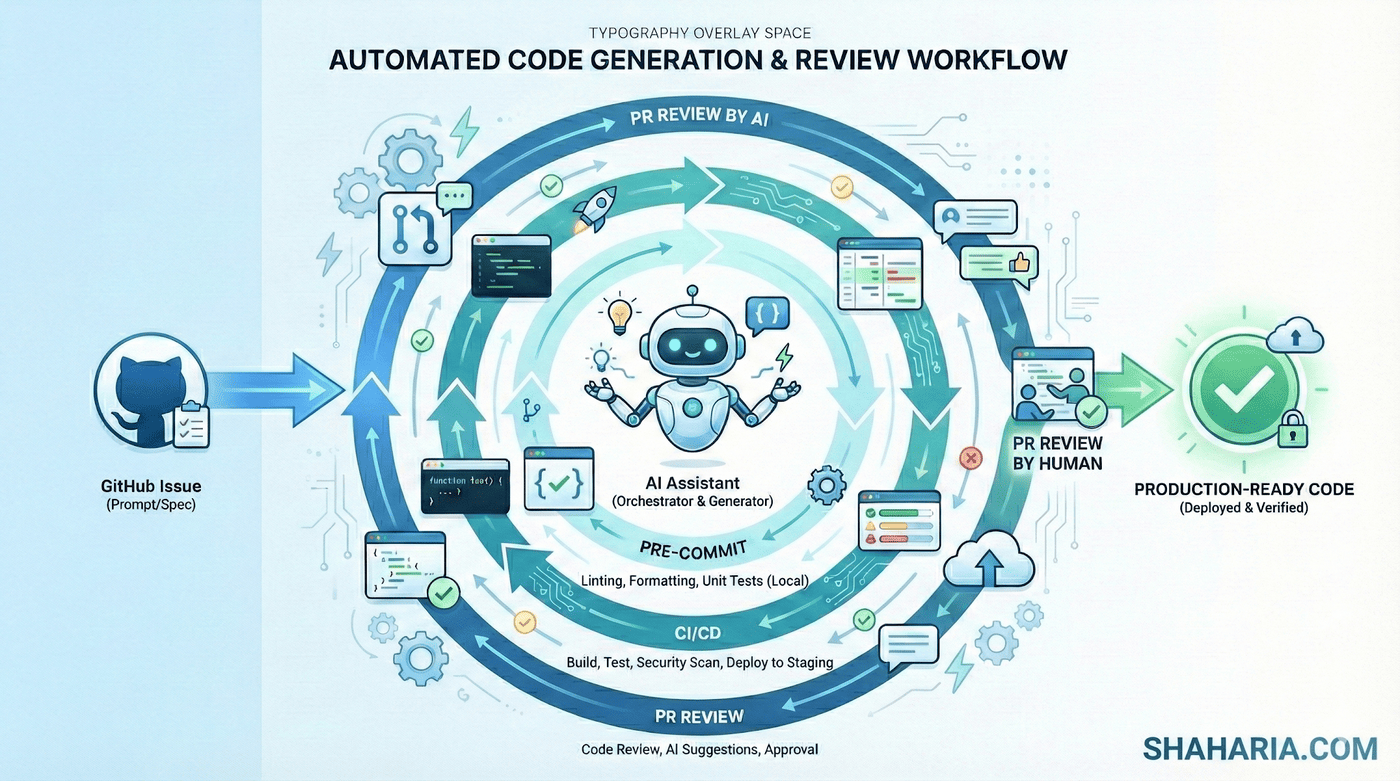
The Automated Code Generation Workflow
How It Works
1. GitHub Issue → Planning
- Claude Code analyzes the issue and codebase
- Generates implementation plan with task breakdown
- Understands existing patterns and conventions
2. Code Generation
- Writes production-quality code automatically
- Implements features following project architecture
- Creates tests, documentation, and error handling
3. Feedback Loop #1: Pre-commit Hooks
- Linters, formatters, type checkers run automatically
- If failures occur, Claude Code analyzes error messages
- Fixes issues and retries until all checks pass
- No human intervention needed
4. Commit & Push
- Changes committed with descriptive message
- Pushed to feature branch automatically
5. Feedback Loop #2: CI/CD Pipeline
- Full test suite runs in CI/CD
- Claude Code watches the workflow
- If tests fail, analyzes logs and fixes issues
- Re-commits and pushes fixes
- Continues until CI passes
6. Feedback Loop #3: PR Review
- Claude Code GitHub Action performs code review
- Checks for bugs, security issues, best practices
- If issues found, Claude Code applies fixes
- Re-enters feedback loops until review passes
7. Human Review & Deployment
- Code is already solid and production-ready
- Human engineer reviews for final approval
- Typically just approves and merges
- Code deploys to production immediately
Why This Works: Continuous Feedback Loops
The magic is in the continuous refinement through multiple feedback loops:
Generate → Pre-commit → CI/CD → PR Review → Fix → Repeat
Each feedback loop validates different aspects:
- Pre-commit: Code style, syntax, basic tests
- CI/CD: Full test suite, integration tests, builds
- PR Review: Logic, security, best practices
Claude Code learns from each failure, fixes the issue, and retries. By the time all loops pass, the code is production-ready.
This happens automatically in ~40 minutes, not hours of manual work.
Real-World Results
Time to Production-Ready Code:
- Traditional: 2-4 hours per issue (manual coding, testing, fixing)
- Automated: ~40 minutes average (AI generates and refines automatically)
Success Rate:
- 90%+ of PRs are merge-ready after automated refinement
- Human just approves and merges—no fixing required
- Edge cases handled by feedback loops automatically
Code Quality:
- Passes all pre-commit hooks, CI/CD tests, and PR reviews
- Production-ready when assigned to human reviewer
- Human focuses on business logic approval, not code issues
The Tech Stack
Tools Used:
- Claude Code CLI: AI-powered code generation and fixes
- Pre-commit Framework: Hooks for linters, formatters, type checkers
- GitHub Actions: CI/CD pipeline + Claude Code PR review
- gh CLI: GitHub interaction from command line
Key Configuration:
- Pre-commit hooks configured for your language/framework
- Claude Code GitHub Action added to
.github/workflows/ - Claude Code CLI with repository access
Getting Started
To implement this workflow:
-
Set up pre-commit hooks:
pip install pre-commit # Add .pre-commit-config.yaml to your repo pre-commit install -
Add Claude Code GitHub Action:
# .github/workflows/pr-review.yml name: Claude Code PR Review on: [pull_request] jobs: review: runs-on: ubuntu-latest steps: - uses: anthropics/claude-code-action@v1 with: github_token: ${{ secrets.GITHUB_TOKEN }} -
Point Claude Code CLI at a GitHub issue:
claude-code issue <issue-number>
# Automatically: plan → generate code → test → fix → commit → push → watch CI → fix again → repeat until solid
The entire code generation cycle becomes automated. Claude Code watches the feedback loops, fixes issues automatically, and produces production-ready code.
The Impact
This workflow transformed how I handle development:
- Speed: GitHub issue to production-ready code in 40 minutes
- Consistency: Production-quality code every time
- Focus: Architect solutions instead of writing boilerplate
- Scalability: Process multiple issues in parallel
- Quality: Human reviews code that’s already solid
The AI generates production-ready code through continuous refinement. By the time you review it, it’s already tested, validated, and ready to merge.
What Humans Do Now
With 90%+ merge-ready success rate, the human role shifts:
Before: Write code → Fix lints → Fix tests → Fix CI → Fix review comments After: Review production-ready code → Approve → Deploy
Humans focus on:
- Architectural decisions and design reviews
- Business logic validation
- Strategic direction and priorities
- Final approval before production
The tedious work—coding, testing, fixing errors, iterating—happens automatically.
Conclusion
This isn’t about AI replacing developers. It’s about AI generating production-ready code so developers can focus on what matters.
By combining Claude Code CLI with feedback loops (pre-commit, CI/CD, PR review), you create a system that:
- Generates code from GitHub issues automatically
- Refines itself through continuous feedback
- Produces merge-ready PRs in ~40 minutes
- Lets humans focus on architecture, not syntax
The result? From GitHub issue to production in 40 minutes, with code that’s already solid when you review it.
Try it yourself:
Want to automate your development process? Have questions about implementing this workflow? Connect with me on LinkedIn—I’m happy to help you set up automated code generation for your team.