Bangla Keyboard Guide (2026): Bijoy, Avro, UniBijoy — Layouts, Downloads, and Comparison
Bangla keyboard guide — Bijoy, Bijoy Bayanno (52), Avro, UniBijoy, Provat compared. Layout chart, free downloads, install guides for Windows, Linux, macOS, Android.
On this page ▾
This is the complete guide to Bangla / Bengali keyboards — what the layouts are, how they differ, which to pick, and where to install each one across Windows, Linux, macOS, Android, and iOS. It’s the page I wish existed when I first started typing Bengali on a non-Windows machine.
If you already know what you want, jump to:
The rest of this page is the comparison and decision tree.
The five Bangla keyboard layouts you’ll meet
There are five layouts that get mentioned interchangeably online — they are not the same thing.
| Layout | Type | Output | Free? | Where it lives |
|---|---|---|---|---|
| Bijoy (1988) | Fixed | ANSI | Paid | Bijoy Bayanno (Windows) |
| Bijoy Bayanno / Bijoy 52 | Fixed | ANSI + Unicode | Paid | Windows |
| UniBijoy | Fixed | Unicode | Free | Avro (Windows/Linux/macOS), IBus (Linux) |
| Avro Phonetic | Phonetic | Unicode | Free | Avro Keyboard (Windows/Linux/macOS) |
| Provat | Fixed | Unicode | Free | Avro Keyboard’s own fixed layout |
Two practical distinctions:
- Fixed vs phonetic. Fixed layouts (Bijoy, UniBijoy, Provat) map each English key to a specific Bengali letter — same idea as QWERTY for English. Phonetic layouts (Avro Phonetic) convert romanised words (“bangla” → “বাংলা”) on the fly.
- ANSI vs Unicode. ANSI Bengali (Bijoy) needs a matching Bijoy font to display correctly. Unicode Bengali (UniBijoy, Provat) renders everywhere modern — web, Office, phones — without special fonts.
If you’re picking fresh today and don’t have legacy ANSI documents, always pick a Unicode layout. It’s portable.
Which Bangla keyboard should you pick?
A short decision tree:
Do you already type Bijoy at school/work?
├── Yes ──> Stay on the Bijoy key map
│   ├── Want it free?     ──> UniBijoy via Avro
│   └── Need paid Bijoy?  ──> Bijoy Bayanno (Bijoy 52)
└── No, you're new to Bengali typing
    ├── Just want it to work, occasionally?
    │   └── Avro Phonetic (type "bangla" → "বাংলা")
    └── Want to invest in a fixed layout for speed?
        └── UniBijoy (free) or Provat (Avro's own)
For 80% of readers, UniBijoy via Avro Keyboard is the right answer. It’s free, Unicode, cross-platform, and the same key map you’d learn for Bijoy — so if you ever need to switch to Bijoy Bayanno later, your fingers are ready.
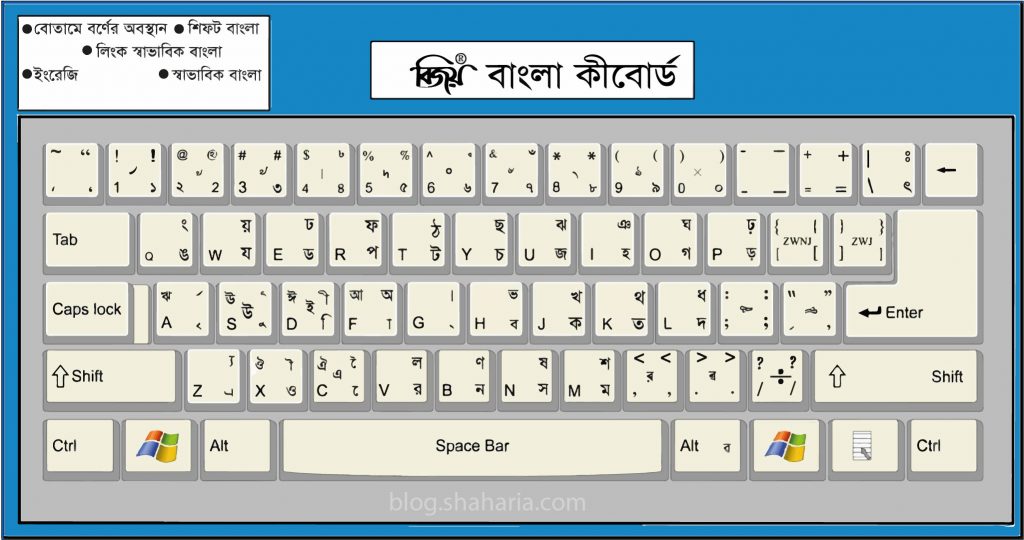
The Bangla key map
This is the Bijoy / UniBijoy / Provat fixed layout — every Bengali consonant, vowel, and modifier mapped to a QWERTY key:
Bangla keyboard chart — Bijoy / UniBijoy / Provat fixed layout. Save as wallpaper while learning.
Highlights:
- Vowels on the right half, consonants on the left.
G→ Bengali full stop।(dari).- Numerals
0–9automatically convert to Bengali numerals০–৯when the layout is active. - Shift + key → aspirated / conjunct forms.
Install guides by platform
Windows
- Free + Unicode → Install UniBijoy in Avro Keyboard (download a
.avrolayout, double-click, restart Avro). - Paid + ANSI/Unicode → Bijoy Bayanno (Bijoy 52) on Windows 11 — the paid option; the .NET Framework 3.5 prerequisite is the only gotcha.
Linux
- Free + Unicode → Install Bangla keyboard on Ubuntu. IBus + m17n-db ships the Bijoy layout under the name “Bengali (Unijoy)”. Works on Ubuntu, Debian, Fedora, Arch, Mint, Pop!_OS.
macOS
- Free + Unicode → On macOS, iAvro from OmicronLab ships UniBijoy + Avro Phonetic — add it from System Settings → Keyboard → Input Sources.
Android
Gboard ships a Bangla (Bijoy) layout. Settings → System → Languages & input → Languages → Add language → Bangla, then in any text field, long-press the spacebar to switch.
For phonetic Bangla on Android, install Ridmik Keyboard from the Play Store — it’s the most popular phonetic Bangla keyboard for mobile.
iOS
iOS only ships phonetic Bengali natively. Settings → General → Keyboard → Keyboards → Add New Keyboard → Bengali.
For a fixed Bijoy layout, install Ridmik Keyboard or Avro Keyboard for iOS from the App Store.
Layout-specific deep dives
These posts go further on a single layout or platform:
- UniBijoy keyboard layout for Avro Keyboard (Windows) — free download + step-by-step install.
- Bangla keyboard on Ubuntu / Linux — IBus + m17n setup.
FAQ
What’s the difference between Bijoy and UniBijoy? Same physical key positions; different output. Bijoy outputs ANSI legacy Bengali; UniBijoy outputs Unicode. UniBijoy is what you want for any modern app.
Is Bijoy Bayanno free? No — it’s paid (BDT ~1,500). Avro + UniBijoy is the free alternative with the same layout.
Can I learn Bijoy without paying for Bijoy Bayanno? Yes — install Avro Keyboard and add the UniBijoy layout. Identical key positions to Bijoy, free.
Which is faster, Bijoy or Avro Phonetic? Bijoy after you’ve built the muscle memory — same reason QWERTY beats hunt-and-peck. Avro Phonetic is faster for occasional typists who don’t want to learn a layout.
Related
- BTRC IMEI check — verify your phone in Bangladesh — separate topic but useful if you also bought a phone in Bangladesh recently.
Stuck on a specific platform or layout? Drop a comment below.